Many accounting and bookkeeping teams already have plenty of tools.
They have QuickBooks or another accounting system. They have a client portal. They have a task tool or practice-management system. They have spreadsheets. They have email templates. Some have Zapier automations. Some have tried ChatGPT for draft emails, summaries, or internal notes.
And still, the same operational problems remain.
Documents are missing. Client answers are buried in old threads. Review notes need context. Open items carry from month to month. Staff handoffs depend on memory. The manager has to reconstruct what happened before deciding what happens next.
That is the point many firms miss when they first look at AI.
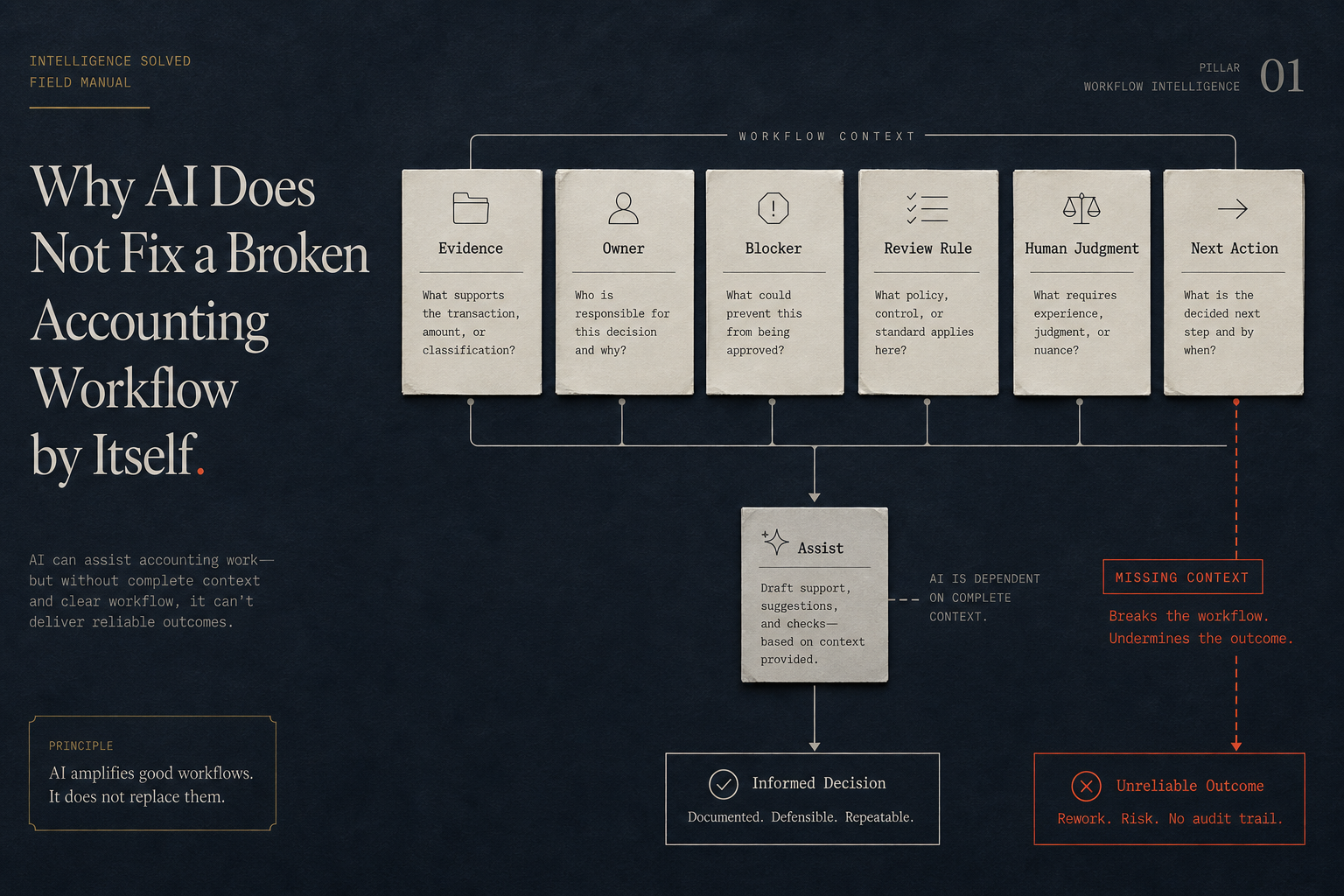
AI does not fix a broken accounting workflow by itself because the problem is not always the absence of automation. Often, the problem is that the workflow context is undefined or scattered.
Software records transactions; workflows move context
Accounting software records financial activity. Communication tools move messages. Task systems track assignments. Portals hold files. Automations move events between systems.
Those tools can all be useful.
But an accounting workflow needs something more specific: context that moves with the work.
Workflow context includes:
- trigger
- owner
- source boundary
- evidence
- status
- blocker
- review point
- escalation path
- next accounting action
When that context is missing, people fill the gap manually.
That is why a team can have modern tools and still feel operationally stuck. The tools may hold pieces of the answer, but no one can see the full workflow state without investigating.
AI does not remove that need. In many cases, AI makes the need more obvious.
Generic AI prompts fail when the workflow is unclear
A prompt can draft a follow-up email. It can summarize notes. It can turn rough language into cleaner language.
But a prompt cannot reliably fix missing source boundaries, unclear ownership, undefined review checkpoints, or vague status.
If the team does not know what evidence is required, AI cannot safely decide that for the firm. If the workflow does not name who reviews the output, AI cannot invent the correct human checkpoint. If the open item is unclear, AI may produce clean language around a messy question.
That is dangerous in accounting work because the issue is not just communication quality. The issue is whether the right context exists for the next accounting action.
AI is more useful when the inputs and rules are structured.
That means the firm should first define what the workflow needs to capture, who owns each step, where human review belongs, and what should happen when information is missing or incomplete.
Zapier and templates are useful but insufficient
Zapier-style automation can move events between tools. Templates can standardize language. Both can help.
But neither one automatically diagnoses the accounting workflow.
An automation can create a task when a client uploads a file. That does not mean the file satisfies the accounting need.
A template can ask for missing documents. That does not mean the request names the right period, account, entity, consequence, or next action.
A prompt can summarize a client thread. That does not mean the summary is review-ready or tied to the close workflow.
These tools are useful after the workflow is clear. They are weaker when the firm is still unclear about what context must be captured, who must review it, and when it escalates.
Without that design, automation may only move confusion faster.
The safety issue is human judgment
Current AI and accounting discussions often mention governance, data management, trust, and human oversight. That emphasis is appropriate.
Accounting workflows involve judgment, review, source evidence, client trust, and sensitive operational information. AI should not be described as an unsupervised accounting worker.
The safer framing is assistive support:
- draft follow-up language from structured inputs
- summarize open items for review
- prompt staff when status lacks an owner or next action
- route review notes to the right person
- prepare a cleaner handoff for human decision
That is different from:
- approving reconciliations
- choosing accounting treatment
- bypassing reviewer judgment
- making compliance decisions
- handling sensitive client information under unapproved privacy claims
The distinction matters.
AI can support the workflow, but the firm still needs human review where accounting judgment belongs.
What must be designed before AI is added
Before a firm adds AI to an accounting workflow, it should be able to answer basic operating questions.
What triggers the workflow?
What source information is allowed into it?
Who owns the next step?
What evidence is required?
What status values are meaningful?
What review checkpoint is mandatory?
What happens when the client response is incomplete?
When does the issue escalate?
What should never be automated?
These questions sound basic because they are basic. But many firms have never made the answers explicit.
Instead, the answers live in staff memory, owner judgment, old emails, informal habits, and one-off exceptions.
That is why AI workflow installation should start with diagnosis, not tool shopping.
How a services-first AI Workflow Install differs from another dashboard
Intelligence Solved is not positioned as a SaaS dashboard, autonomous product, or generic AI platform.
The services-first install starts with a specific bottleneck. For example:
- client document chase
- month-end close drag
- open-item tracking
- review note routing
- staff handoff failure
- reporting pack archaeology
The goal is to define the operating context around that bottleneck and install a workflow the team can actually use.
That includes the trigger, owner, source boundary, evidence rule, status rule, review point, escalation path, and next action. AI-assisted support can then be added where it helps the workflow move cleaner context, not where it replaces accounting judgment.
For a small team, this is a more practical starting point than buying another tool and hoping the workflow improves later.
The better first step
If your firm is considering AI, start smaller and sharper.
Do not ask, "What AI tool should we buy?"
Ask, "Which accounting workflow keeps forcing us to rebuild context?"
That question will usually point to the right first install.
Send Intelligence Solved one accounting workflow bottleneck before buying another tool. The first useful step is diagnosis: what breaks, where context gets lost, who owns the next action, and where human review must stay in control.