Most accounting teams are not drowning in judgment.
They are drowning in nonsense.
Not the real accounting. Not the part where someone experienced looks at a messy situation and makes an actual call. Not the part that deserves a CPA, a controller, or anyone wearing the expression of a person who has seen Q4 before.
The real sinkhole is everything before that.
Missing receipts. Wandering invoices. Approval bottlenecks. Reminder loops. Reconciliation prep. Three people forwarding the same email chain like they are passing a cursed amulet. The weekly office séance where everybody asks, wait, who has this now? and nobody wants to make eye contact.
That is where the time goes.
Not in elite financial judgment. In administrative slapstick.
So this is not another AI is replacing accountants article written by somebody who has clearly never watched month-end turn into a hostage negotiation involving four PDFs, two spreadsheets, one mystery charge, and a vendor who says, with full confidence, we definitely sent that last Tuesday.
This is a field manual.
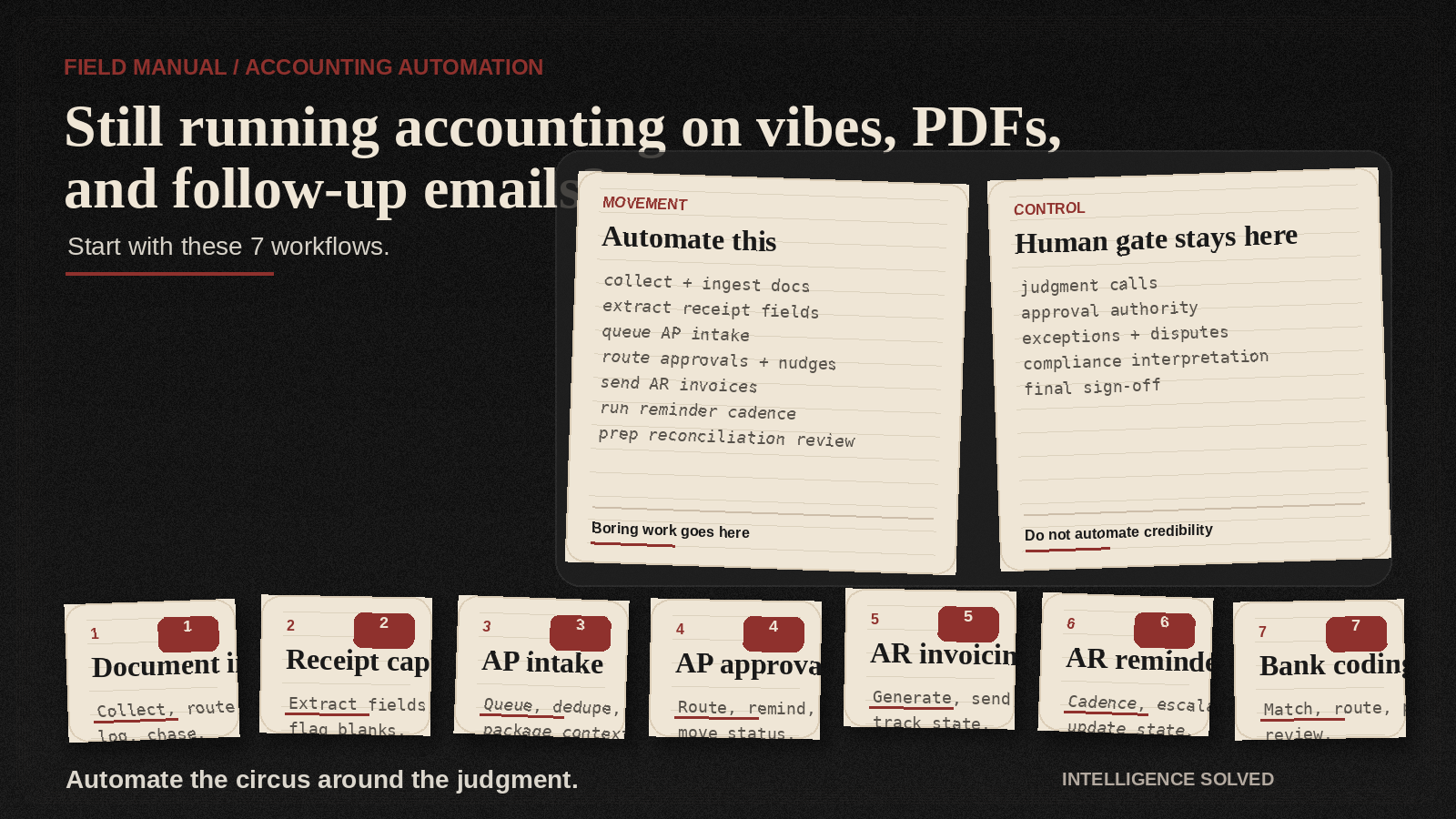
It covers seven accounting workflows that can be automated from trigger to handoff while keeping human control exactly where it belongs: judgment, exception handling, approval authority, compliance interpretation, and final sign-off.
Because that is the actual win.
Automate the chaos. Keep the judgment.
What fully automated actually means here
Before somebody reads fully automated and starts imagining the controller being replaced by a dashboard named Brayden, let's clean this up.
Here, fully automated does not mean no-touch accounting.
It means the workflow can move from trigger to handoff without constant manual chasing, nudging, routing, packaging, status reconstruction, and inbox archaeology carried out with the solemnity of a museum dig.
It still pauses anywhere a human needs to: - review - approve - interpret - resolve an exception - sign off
That distinction is not legal wallpaper. It is the whole point.
A simple rule: - If the work is collection, routing, extraction, reminder logic, status movement, packaging, or reconciliation prep, it is usually a strong automation candidate. - If the work requires accounting judgment, compliance interpretation, exception resolution, approval authority, or final client-facing sign-off, the human control gate stays.
So yes, automate aggressively.
Just do not automate your credibility into a sinkhole and call it transformation.
Start with this question
Before you look at the seven workflows, ask this:
Which parts of your accounting workflow still depend on staff chasing documents, routing context, following up, reconciling status, or reconstructing handoffs before a qualified reviewer can even begin?
That is usually where the real bottleneck is.
Not the expert work.
The obstacle course wrapped around the expert work.
The part of the process that feels less like finance and more like a group project designed by a landlord.
1) Document collection and ingestion for bills and receipts
This is where a shocking amount of accounting labor is still just professional scavenger hunting.
What can be automated: - request triggers for missing bills, receipts, and supporting documents - collection workflows tied to client, vendor, or transaction type - intake routing into the right folder, queue, or system destination - status tracking for what is in, what is missing, and what is still outstanding
Where the human control gate stays: - confirming the submitted material is actually the right document set - deciding whether the package is complete enough for review - resolving edge cases involving incomplete, inconsistent, or sensitive records
Why this matters: If your team is still spending Tuesday hunting PDFs like they are on a low-budget season of National Treasure: Accounts Payable, that is not a people problem. That is a workflow problem wearing khakis.
2) Receipt and invoice data capture and extraction
Once the documents arrive, somebody still has to turn the pile into usable data.
That part is highly automatable.
What can be automated: - capture of receipt and invoice files from intake sources - extraction of standard fields into downstream workflows - routing low-friction records into the correct processing queue - flagging missing fields or low-confidence extractions for review
Where the human control gate stays: - validating questionable extractions - interpreting unusual line items or coding ambiguity - deciding whether extracted data is safe to move forward
Why this matters: The issue is rarely that a professional cannot read a receipt. The issue is that somebody still has to manually convert a swamp of random attachments into something the rest of the workflow can use.
That job has the glamour of peeling potatoes in county jail.
3) Accounts payable invoice intake and processing
AP intake is one of the clearest examples of workflow drag dressed up as finance work.
Long before anyone decides whether to pay anything, the business is already leaking time through inbox triage, duplicate review, routing confusion, and handoff nonsense.
What can be automated: - invoice receipt and intake routing - duplicate detection checks where the workflow supports them - queueing by entity, vendor, due date, or approval path - handoff packaging so reviewers get the right invoice context without rebuilding it from scraps
Where the human control gate stays: - confirming invoice legitimacy in edge cases - reviewing disputed charges or unclear coding - deciding whether the invoice is ready for approval progression
Why this matters: A lot of AP delay has nothing to do with payment decisions. It is just paperwork chaos in a fake mustache pretending to be a strategic finance issue.
4) Accounts payable approval and payment coordination
This is where companies get one software demo deep and start making terrible life choices.
The coordination layer? Automatable.
The approval authority? Human. Extremely human. Ideally awake.
What can be automated: - routing invoices to the right approver sequence - reminder logic when approvals stall - status movement between submitted, pending, approved, and ready states - payment coordination steps after approval, where the rules are already defined
Where the human control gate stays: - the approval decision itself - exception handling when the amount, vendor, timing, or supporting context looks wrong - any final release step that requires authorized sign-off
Why this matters: The expensive delay is usually not the approval itself. It is the circus around approval.
Wrong person. Missing context. No reminder. No visibility. One invoice sitting in a queue for nine days like it signed a lease there and plans to raise children.
5) Accounts receivable invoicing
AR invoicing is a strong automation candidate because the workflow is usually predictable once the trigger is known.
What can be automated: - invoice generation from predefined workflow triggers - routing invoices through the correct delivery path - status tracking for sent, viewed, paid, or overdue states - handoff signals when a record needs manual attention
Where the human control gate stays: - validating invoice exceptions or unusual billing logic - reviewing disputes or client-specific edge cases - approving nonstandard terms, credits, or adjustments
Why this matters: If invoicing still depends on manual assembly and handoff, cash movement slows down for reasons that have nothing to do with accounting judgment and everything to do with process design.
That is not sophisticated finance. That is clerical traffic with a nicer haircut.
6) Accounts receivable reminder and follow-up sequences
Reminder loops are repetitive, rules-based, and weirdly capable of eating human attention one tiny follow-up at a time, like termites with Outlook access.
What can be automated: - reminder cadence based on invoice status and timing rules - follow-up sequencing across defined checkpoints - internal escalation when reminders fail or a threshold is hit - status updates so the team can see which accounts need human intervention
Where the human control gate stays: - deciding when a client situation needs a tailored conversation - handling disputes, relationship-sensitive accounts, or nonstandard payment arrangements - making judgment calls on escalation tone or commercial flexibility
Why this matters: The machine should handle the predictable reminder pattern.
Humans should step in when the account becomes a judgment call, not when invoice number 418 is ghosting its third reminder like it moved to Lisbon to find itself.
7) Bank transaction coding and reconciliation
This is one of the cleanest examples of workflow movement versus accounting judgment.
What can be automated: - transaction matching against expected records - routing unmatched or ambiguous items into review queues - status packaging that shows what cleared, what failed, and what still needs attention - reconciliation prep workflows that organize the work before final review
Where the human control gate stays: - resolving exceptions or ambiguous transactions - validating final coding decisions in sensitive cases - signing off on the reconciled output
Why this matters: You can automate the preparation and movement around reconciliation without pretending final accounting judgment floated into heaven and came back as a SaaS product.
That distinction is what keeps this credible.
And credibility matters in finance, where one stupid promise can turn a software pilot into a campfire story.
What this means commercially
Business owners do not need another vague article about the future of AI in finance.
They need a practical way to separate: - the workflow steps that should move automatically - the control points that still need qualified human review
That makes implementation safer.
It also makes the buying conversation easier.
Now the question is not:
Should we replace people with AI?
The better question is:
Which workflow is wasting the most expert time, and where can automation carry the load safely?
That question leads to actual implementation.
Not a demo.
Not a pilot.
Not a dashboard.
Not a six-month internal initiative where everybody says change management a lot and the only thing that improves is the snack budget.
If your team is still losing expert time to document chase, routing drag, reminder loops, approval coordination, and reconciliation prep, do not start with a software shopping spree and a keynote voice.
Start by mapping the workflow.
Mark the control gates.
Then pick the first lane where automation can do the boring part better than a tired human with 46 tabs open, one dying laptop battery, and a deep personal grudge against PDF attachments.
If you want a low-friction starting point, send the lane that breaks most often, the handoff that keeps stalling, or the approval path that still depends on manual chasing.
That is enough to scope a first pass.
Email mark@intelligencesolved.com to have Intelligence Solved scope the workflow.
Unsupported-claim exclusions
This piece should not be shortened or repackaged into claims like: - ROI or time-savings promises without evidence - accuracy improvement claims without evidence - compliance improvement claims without evidence - staffing reduction or headcount replacement claims - claims that AI replaces CPA judgment, compliance interpretation, or final sign-off - claims that all seven workflows run with no human control gates - claims that cited vendor categories prove Intelligence Solved customer outcomes - SaaS, dashboard, or software-product positioning that moves the run away from a services-first install